PO-DEMO-1001Checked fields match
Northbridge Components Ltd · 2 lines checked
Quantity, price and delivery dateNo differences found
ResultLeaves the buyer action queue
Built for Sage 200 purchasing teams
Sage Confirmation compares supplier purchase-order confirmations against your Sage 200 purchase orders, clears confirmations with no differences in the checked fields and puts the exceptions in a buyer queue for action.
No sales call required. Review the product below and request payment details by email if you want to test it with your own purchase orders and supplier confirmations.
Product demo
The workflow is designed to make confirmations with no differences in the checked fields quiet and exceptions obvious. These examples mirror the core product experience.
Northbridge Components Ltd · 2 lines checked
Fenwick Parts Ltd · Price and delivery date changed
The exception stays visible until the buyer has finished the follow-up.
Product in action
These are screenshots from the working product using demo purchase orders and supplier confirmations, not customer data.
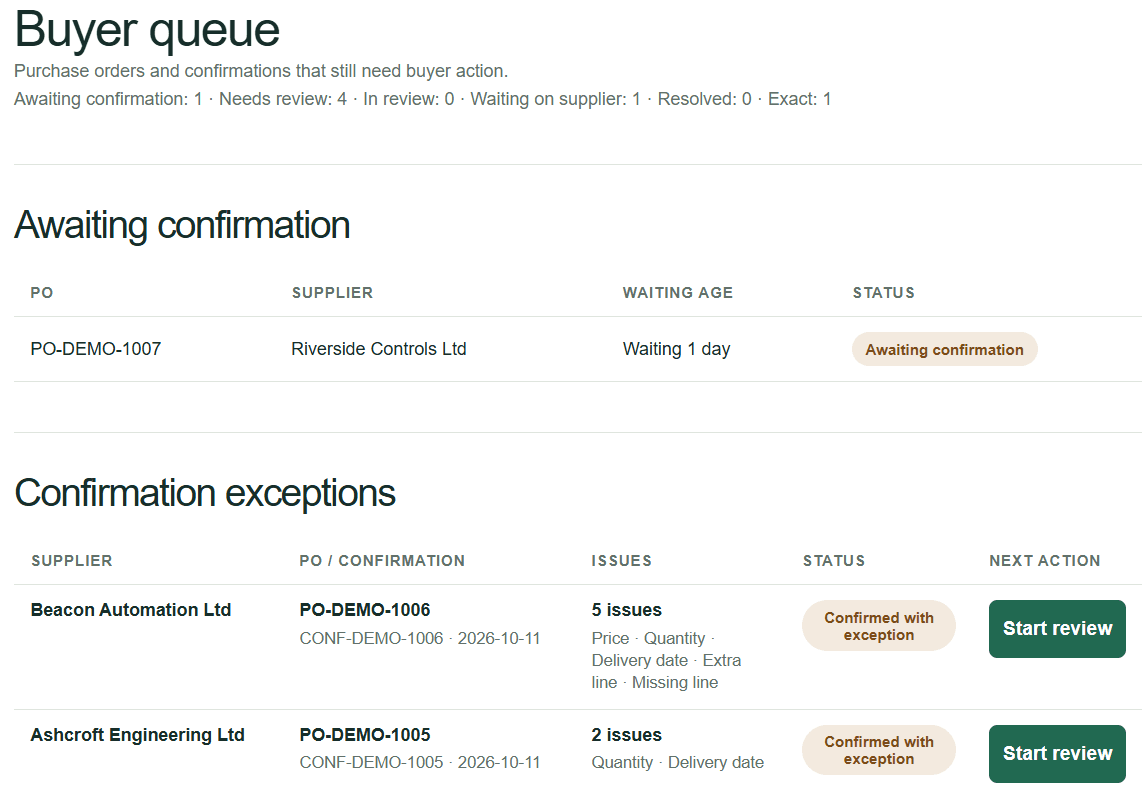
See which purchase orders are still waiting and which confirmations need buyer action.
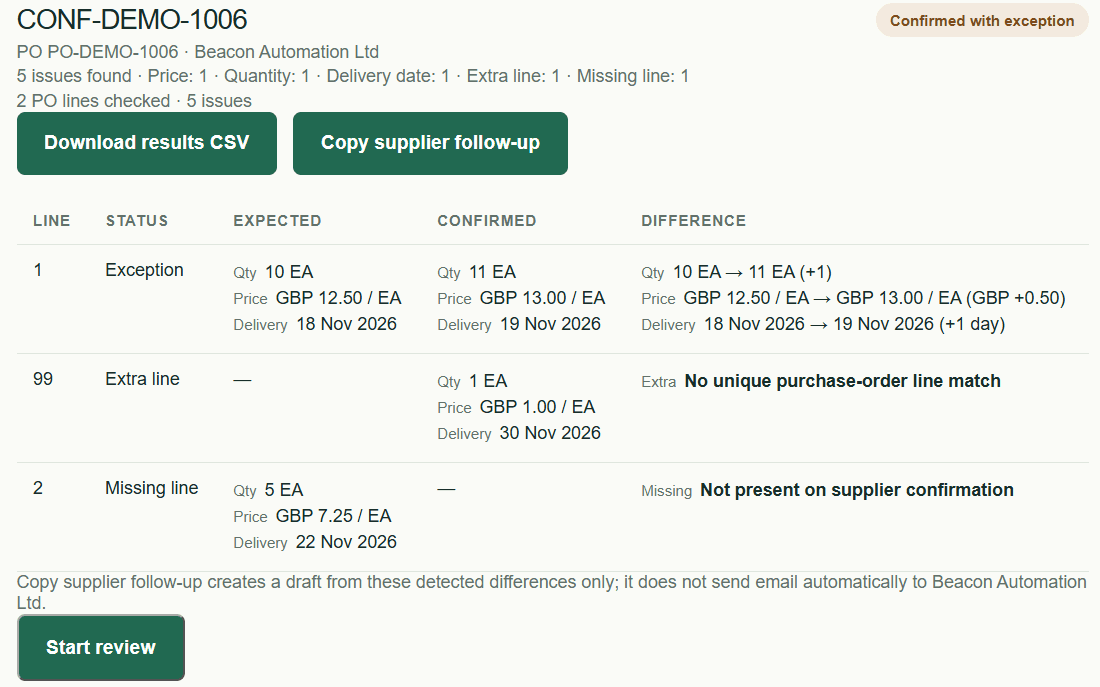
Quantity, price, delivery date, missing lines and extra lines are shown as concrete differences.
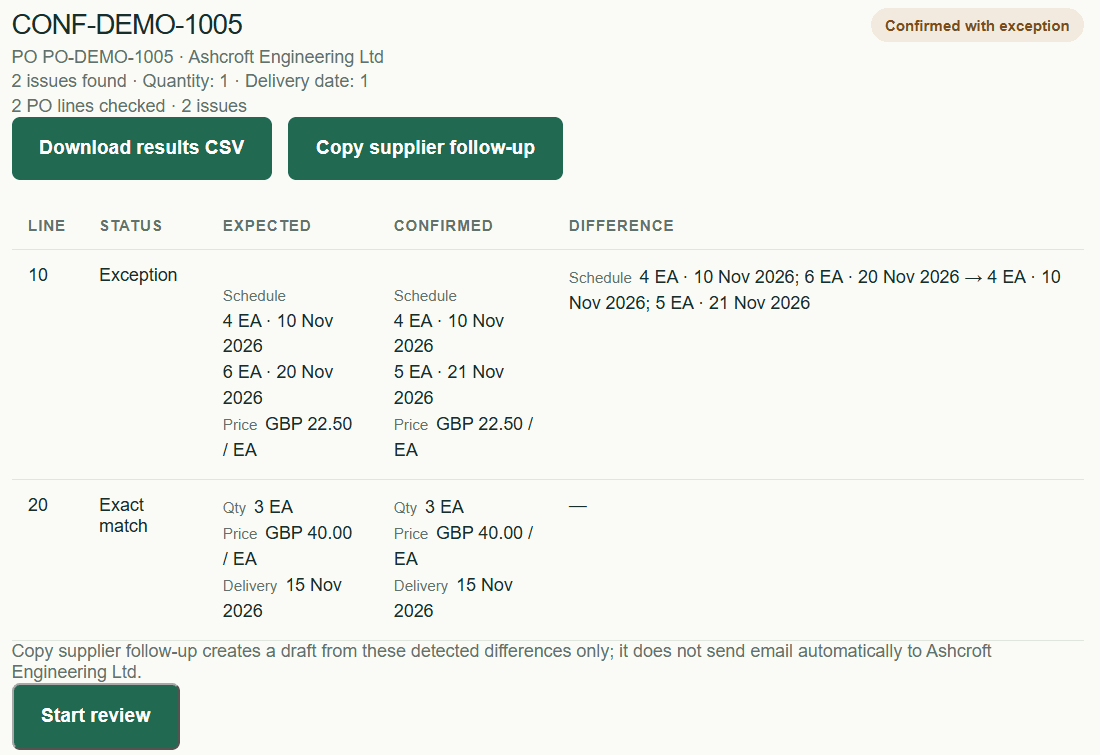
Split schedules are compared by quantity and delivery date, not treated as a single total.
How it works
Bring in Sage 200 purchase-order data using CSV or XLSX. No Sage connector is required for the beta.
Use the PDF Beta for AI-assisted extraction with human review, or use CSV/XLSX as the fallback path.
Deterministic matching compares the fields currently supported by the beta and keeps differences visible for buyer review.
The Buyer queue shows what changed, supports supplier follow-up and keeps the issue visible until it is resolved.
What the beta is testing
Sage Confirmation is intentionally narrow: it helps a buyer check core supplier-acknowledgement fields against purchase orders, follow up on supported exceptions and close the issue. The beta avoids deep Sage integration so you can test the workflow quickly with real files.
Beta coverage
The beta is transparent about its current comparison scope. A confirmation with no flagged differences means the fields below matched; it does not mean every commercial or industry-specific term on the document has been verified.
PO line / customer or supplier part identification
Ordered versus confirmed quantity
Unit price
Buying unit and price unit
Requested versus confirmed delivery date
Split-delivery quantities and dates
Missing PO lines and extra confirmation lines
Currency
Supplier identity and PO reference as printed on the confirmation
Ship date or lead time when separate from delivery date
Payment terms
Incoterms and named delivery place
Project or job reference
Specification, grade or material requirements
Certificates / COA, packaging, labelling and other special instructions
Supplier free-text substitutions, qualifications or exception notes
If one of these additional fields is mandatory in your purchasing process, include it when requesting payment details. That lets us confirm pilot fit before you start.
Paid beta
The paid beta is designed for a small Sage 200 purchasing team that wants to find out whether automated supplier-confirmation checking removes enough manual work to be worth keeping.
No sales call required. Payment is by invoice and bank transfer. Replying opens a pre-written email request; you can add your company, billing details and any mandatory confirmation checks before sending it.